Milton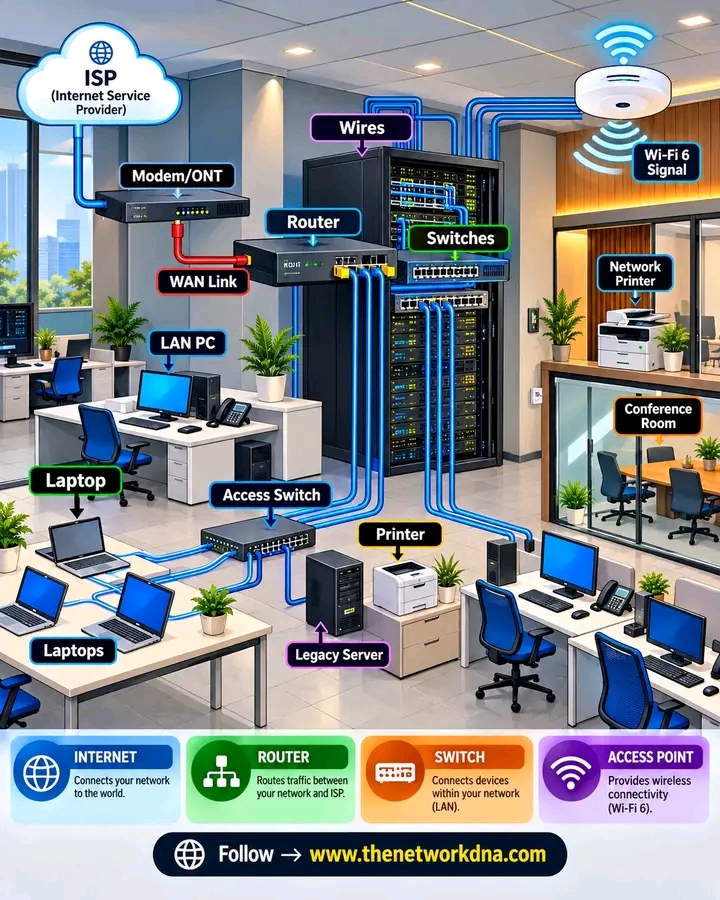
🌐 FROM ISP TO EVERY DESK — HOW AN OFFICE NETWORK CONNECTS! 💻🔌
Ever wondered what happens between your ISP connection and the laptop sitting on your desk? This visual breaks down a typical office network from the Internet edge to wired and wireless users. 👇
☁️ ISP → Modem/ONT
The ISP provides the Internet connection, which reaches the office through the modem/ONT.
🔴 WAN Link → Router
The router connects the organization’s internal network to the outside world and handles traffic between networks.
🔵 Router → Core/Distribution Switches
Switches provide connectivity to different parts of the office and connect downstream access switches.
🖥️ Access Switch → End Devices
Laptops, PCs, printers, phones, and other wired devices connect through Ethernet.
📡 Wi-Fi → Wireless Devices
Wireless access points provide connectivity for mobile devices, laptops, and other Wi-Fi clients.
🖨️ Network Printers • Servers • Conference Rooms • Workstations
All these devices become part of the broader enterprise network.
💡 The basic path:
ISP → Modem/ONT → Router → Switches → Access Switch → End Devices
📶 And for wireless users:
Network → Access Point → Wi-Fi → Laptop / Smartphone / IoT
#education #networking #technology #fblifestyle #fyp