Milton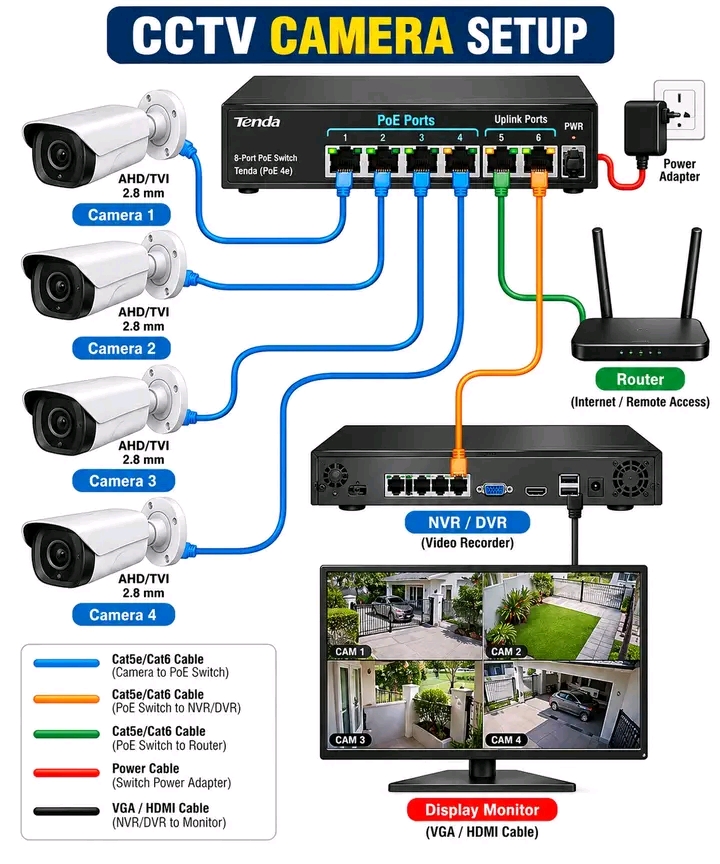
Setting up a CCTV system is more than just connecting cameras. Understanding the network path makes installation and troubleshooting much easier!
🔵 Cameras → PoE Switch
Connect the cameras to the PoE switch using Ethernet cabling. The switch can provide network connectivity and PoE power to compatible IP cameras.
🟢 PoE Switch → Router
The router provides network connectivity and can enable remote access when the CCTV system is properly configured and secured.
🟠 PoE Switch → NVR/DVR
The recorder receives the camera video streams for recording, playback and management.
⚫ NVR/DVR → Monitor
Use HDMI/VGA to connect the recorder to a display for live viewing and playback.
💡 Basic topology:
📷 Cameras
⬇️
🔌 PoE Switch
↙️ ↓ ↘️
🌐 Router | 🎥 NVR/DVR
⬇️
🖥️ Monitor
🔧 Network Engineer Tip
Always verify:
✅ PoE compatibility
✅ Correct Ethernet cabling
✅ Camera IP addressing
✅ NVR/DVR network configuration
✅ VLAN and network segmentation
✅ Secure remote access
✅ Strong administrator credentials
📌 Save this diagram for your next CCTV installation or troubleshooting session!